

Hosted landing pages: overview
Host HTML landing pages directly on your SiteDetour link domain, built with a visual editor or generated by AI.
Overview
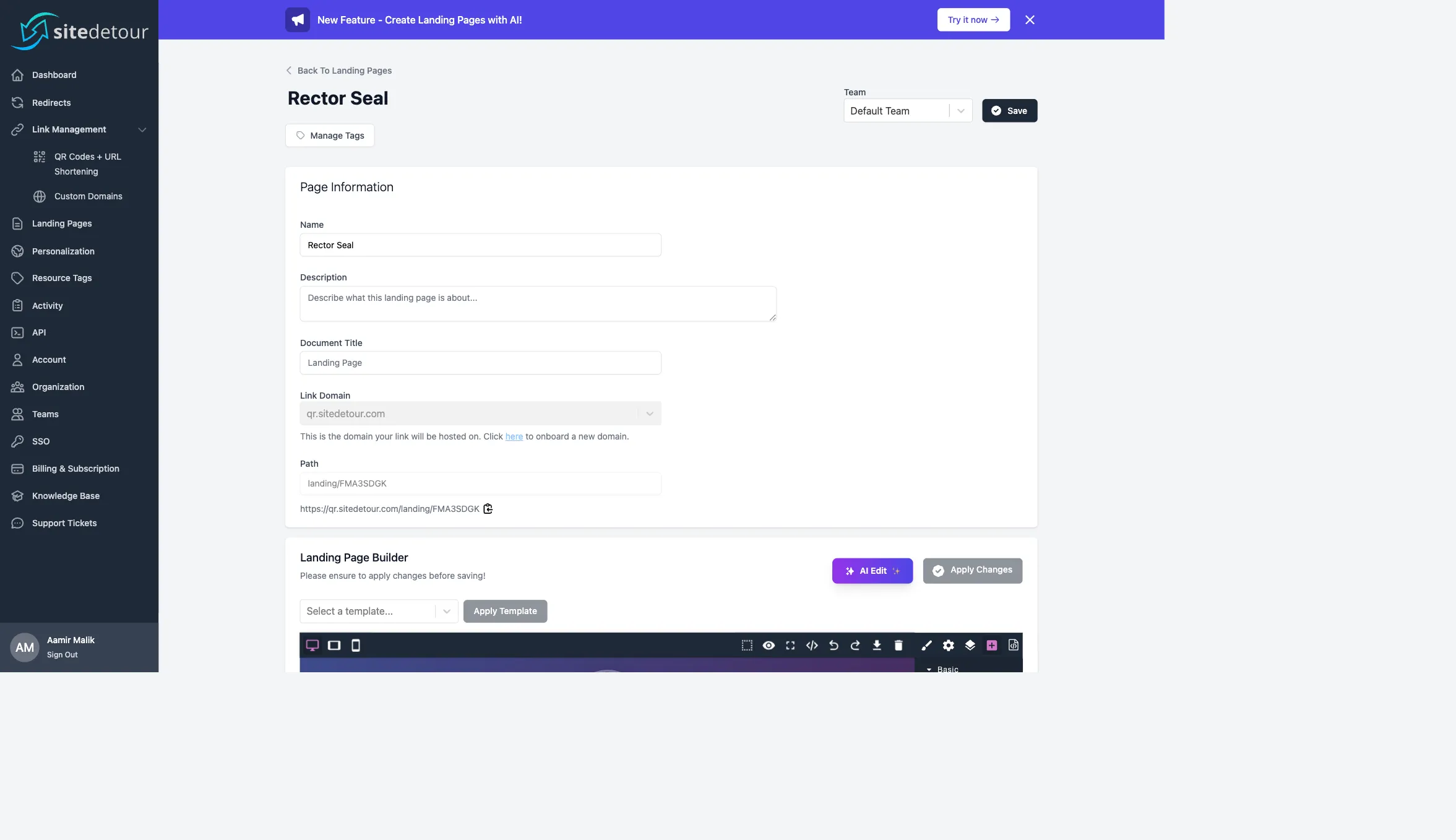
SiteDetour hosts landing pages directly on your link domains. A landing page has an HTML body, an optional document title, a slug, and a domain — and it is served at https://{link-domain}/landing/{path}. Pages are built either by hand with the drag-and-drop editor or from a prompt via the AI generator.
Because landing pages live on the same link domain as your short URLs and QR codes, you get a single branded surface for the entire campaign — the short URL, the landing page, and the analytics are all under one hostname.
When to use a landing page vs. a redirect
Reach for a landing page when:
- You don't have a web property to redirect to, or the target is a third-party site you want to frame/wrap first.
- You need a bridge page for legal disclosure, age-gating, or regional opt-in before the final destination.
- You want a campaign-specific microsite with its own copy, hero, and CTA, without touching your production site.
- You need the page to render instantly and be instantly editable (no deploy pipeline).
Reach for a redirect when you have an existing URL to send traffic to and you don't need HTML control.
The page data model
Each landing page has:
- Name — internal label.
- Description — internal notes.
- Document Title — the
<title>tag content that shows in browser tabs and SEO snippets. - Link Domain — hostname the page is served from. Same picker as Smart Links.
- Path — auto-generated short identifier or a custom path. Pages live at
/landing/{path}. - HTML body — produced by the visual builder.
- Tags — arbitrary organizational labels.
- Team — scope to a team if your plan supports them.
The drag-and-drop builder
SiteDetour's landing-page builder is a drag-and-drop visual editor with standard conventions:
- Three viewport previews (desktop, tablet, mobile) via the device toolbar.
- Outline panel showing the element hierarchy.
- Style Manager for CSS properties.
- Component library (sections, columns, text, images, links, buttons, forms).
- Raw HTML/CSS editing via the code view.
- Templates — choose a starting template from the dropdown above the canvas.
- Click Apply Changes to commit the current state into the page record, then Save to persist it server-side.
The Apply Changes → Save flow is important: the builder works in a local buffer and you must apply before saving, otherwise in-progress edits will not be written.
AI-generated landing pages
Click AI Edit in the builder toolbar to describe the page you want. The AI generator takes a prompt like "A modern SaaS landing page for a project management tool with a hero, three feature cards, and a call to action to book a demo" and returns HTML/CSS that is loaded back into the builder canvas.
Generation is asynchronous. While the job runs, the status cycles through pending → processing → completed / failed. You can continue editing other pages while a generation is in flight.
After the generator finishes, the output lands in the builder as a normal editable document. Nothing about the AI output is "locked" — it's fully editable HTML/CSS, and you can iterate on it by running another prompt or by hand.
Image uploads
The builder supports uploading images via the Asset Manager. Images are persisted on SiteDetour's storage and referenced by URL in the page HTML.
Publishing and accessing the page
As soon as a page is saved, it is live at https://{link-domain}/landing/{path}. There is no separate "publish" step — the saved state is the live state. If you need staged workflows, duplicate the page, work on the copy, and update the path when ready.
Using a landing page with a Smart Link
A landing page URL is a valid target for a Smart Link's default target or smart targets. A common pattern:
- Create a Smart Link (QR code) pointing to landing page A as the default target.
- Add smart targets that override the destination for specific audiences (mobile users, specific countries, etc.).
- Scan traffic through the QR → lands on the dynamically-selected landing page (A, B, C...) without touching the QR asset.
Analytics on landing pages
Landing page hits are captured in the same analytics pipeline as redirects and Smart Links — countries, devices, referrers, and time series are all available in the dashboard.
Plan availability
Landing page caps are visible on the Billing page. The AI Edit feature requires a paid plan.
Next steps
