

Smart QR codes and short URLs: when to use each
How SiteDetour unifies QR codes and short URLs into a single Smart Link with customizable images and smart targeting.
Overview
SiteDetour unifies QR codes and short URLs under a single construct called a Smart Link. Every Smart Link has a short URL hosted on a domain you control, an image of the matching QR code that decodes to that URL, and an optional set of smart targets that vary the destination based on who is scanning or clicking.
This article covers the mental model, when to pick a QR code vs. a short URL, and how Smart Links tie into domains, analytics, and personalization.

The Smart Link data model
Each Smart Link has these parts:
- Link domain — the hostname the short URL is served from. Defaults to
qr.sitedetour.com. You can onboard your own custom domain under Custom Domains. - Path — either auto-generated as a short, URL-safe identifier (e.g.
FMA6rfw8) or a custom path you choose. The fully-qualified short URL ishttps://{link-domain}/{path}. - Default target URL — the destination a scanner or clicker lands on unless a smart target overrides it.
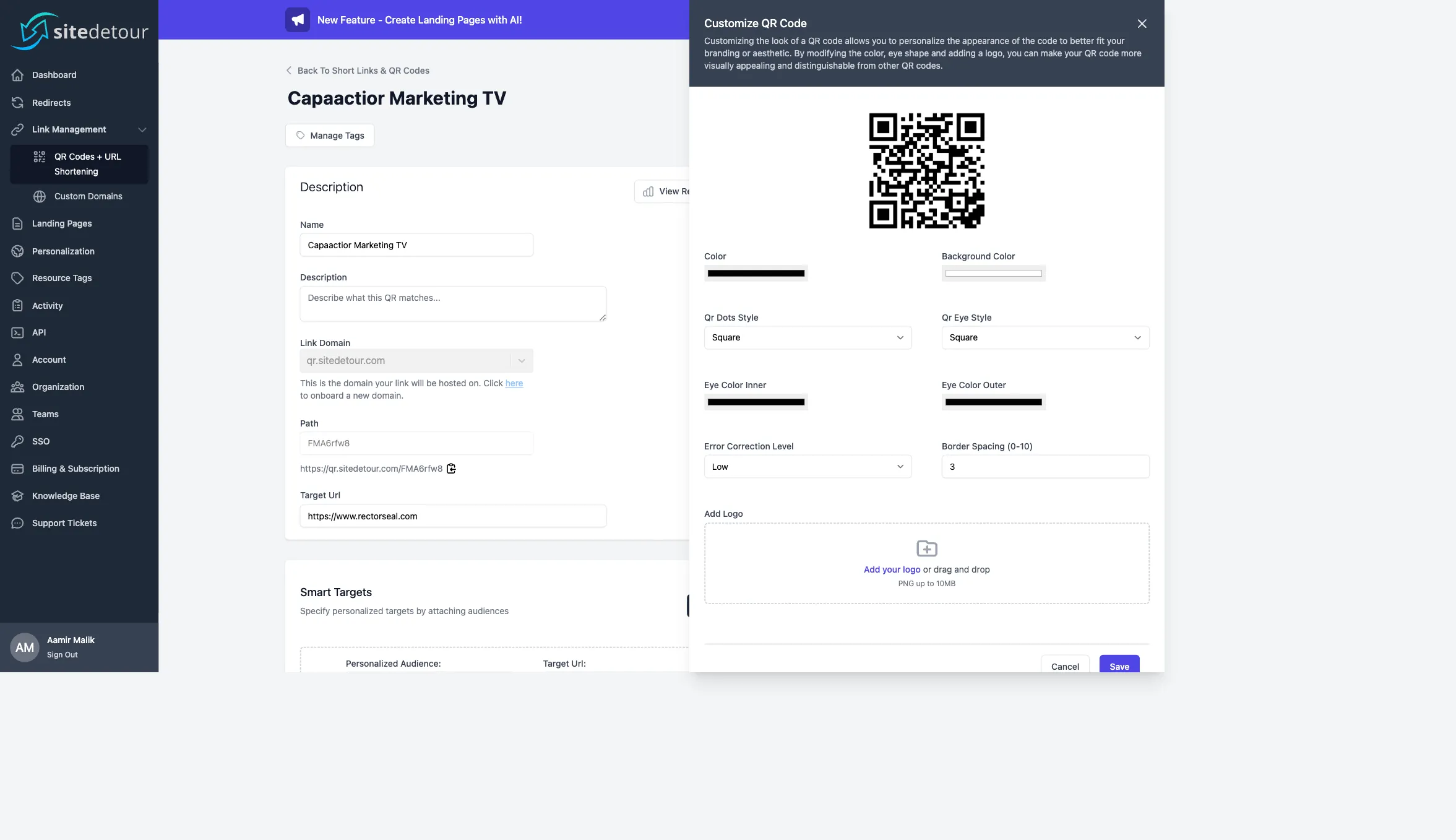
- QR image — rendered by SiteDetour server-side, downloadable as PNG/SVG/PDF and customizable (colors, eye styles, dot styles, logo overlay, error correction level).
- Smart targets — zero or more conditional redirects, each tied to a personalization audience.
When to use a short URL vs. a QR code
The short URL and the QR code are two presentations of the same underlying resource. You don't have to pick one — both are available on every Smart Link. Usage depends on surface:
- Short URL: social posts, SMS, email, chat. Anywhere text is clickable. Scales the short URL's brand to wherever text is copied.
- QR code: print, billboards, packaging, signage, slides, broadcast. Anywhere you need a camera bridge from physical to digital.
Because both share the same target URL and analytics stream, you can retire a short URL campaign and re-use the same underlying Smart Link for a print/QR campaign without starting from scratch.
Editable destination (no reprint needed)
QR codes generated outside SiteDetour are typically static: the URL they encode is frozen. SiteDetour Smart QR codes are dynamic — the QR encodes the short URL on your link domain, and the short URL resolves to whatever destination you currently have configured. Change the target URL any time without reprinting.
A printed QR that points to https://qr.sitedetour.com/FMA6rfw8 stays valid forever as long as the path and link domain stay the same. What the short URL redirects to is editable in real time.Smart targeting
The real power of the Smart Link shows up in smart targets. A single short URL or QR can resolve to different destinations based on personalization rules. Examples:
- Spanish speakers → Spanish-language landing page; everyone else → English page.
- Mobile device → App Store on iOS, Play Store on Android; desktop → marketing page.
- Visitors within a 5-mile radius of a store → that store's appointment page; everyone else → a national page.
- Hour of day between 9:00 and 17:00 local time → live chat; after-hours → a contact form.
Smart targets evaluate in order. The first matching audience wins; if no target matches, the default target URL is used. See What is a personalization audience? for how to define the audiences used here.
Creating a Smart Link
Go to Short Links & QR Codes and click Create New. Required fields:
- Name — internal label, not visible to end users.
- Link Domain — pick a domain. Use
qr.sitedetour.comif you haven't onboarded a custom domain yet. - Target Url — the default destination.
Optional:
- Description — free text for team notes.
- Custom Path — click Add Custom Path to override the auto-generated path. Paths must be unique per link domain.
- Team — scope the Smart Link to a team (Business and Enterprise plans).
Click Save. The QR code image renders on the right side of the editor and is immediately downloadable.

Customizing the QR code image
Click Customize QR on the Smart Link editor to open the customization panel. Available controls:
- Color and Background Color — use high-contrast combinations for reliable scanning. Dark-on-light is the safest.
- QR Dots Style —
Square, rounded variants. - QR Eye Style — shape of the three positional squares at the corners of the code.
- Eye Color Inner / Outer — separate colors for inner and outer eye rings.
- Error Correction Level —
LowtoHigh. Higher correction tolerates more damage and allows a larger logo overlay, but increases code density. - Border Spacing — quiet zone around the code, 0–10 modules.
- Logo — upload a PNG (up to 10 MB). Keep it centered and avoid covering more than 30% of the code; pair with higher error correction.
For AI-generated QR code art (the code embedded inside a stylized image), use Generate AI QR Code Art.
Analytics and observability
Every scan or click on a Smart Link's short URL is captured as a hit. The Smart Link editor links to the analytics view via View Realtime Analytics. Metrics available:
- Hits over time (hourly, daily, weekly, monthly granularities).
- Top countries (via anonymized IP lookup).
- Top referring domains.
- Referrer source category (direct, organic, paid, social, referral).
- Device type (mobile, desktop, tablet).
- Request protocol (HTTP vs. HTTPS).
Hits are also available through the API — see the API overview for how to pull them programmatically.
Choosing a link domain
Short URLs on qr.sitedetour.com work out of the box with no DNS configuration. If you want branded short URLs (e.g. go.yourbrand.com/winter2024), onboard a custom domain under Custom Domains. SiteDetour provisions a free SSL certificate for each custom link domain and handles renewals automatically.
If your custom domain sits behind a reverse proxy like Cloudflare, toggle Enable Reverse Proxy Support when onboarding — this allows SiteDetour to extract the real client IP from X-Forwarded-For rather than trusting the connection's remote address.
Limits and plan caps
Per-plan caps on hosted Smart QRs are visible on the Billing page. The API rate limit for programmatic Smart Link operations is 240 requests per minute per access token.
Next steps
