

What is a personalization audience?
A reusable bundle of targeting rules that routes visitors to different URLs at the SiteDetour redirect layer.
Overview
A personalization audience in SiteDetour is a reusable bundle of targeting rules that identifies a subset of visitors. Audiences are attached to smart targets on a Smart Link (QR code or short URL) or to conditional rules on a redirect, and they determine which destination URL a given visitor is routed to.
Unlike client-side personalization that runs JavaScript after the page loads, SiteDetour evaluates audience rules at the redirect layer — before the browser ever hits the target URL. This means personalization works on print QR codes, email links, SMS short URLs, and anywhere else a URL is the only contract.
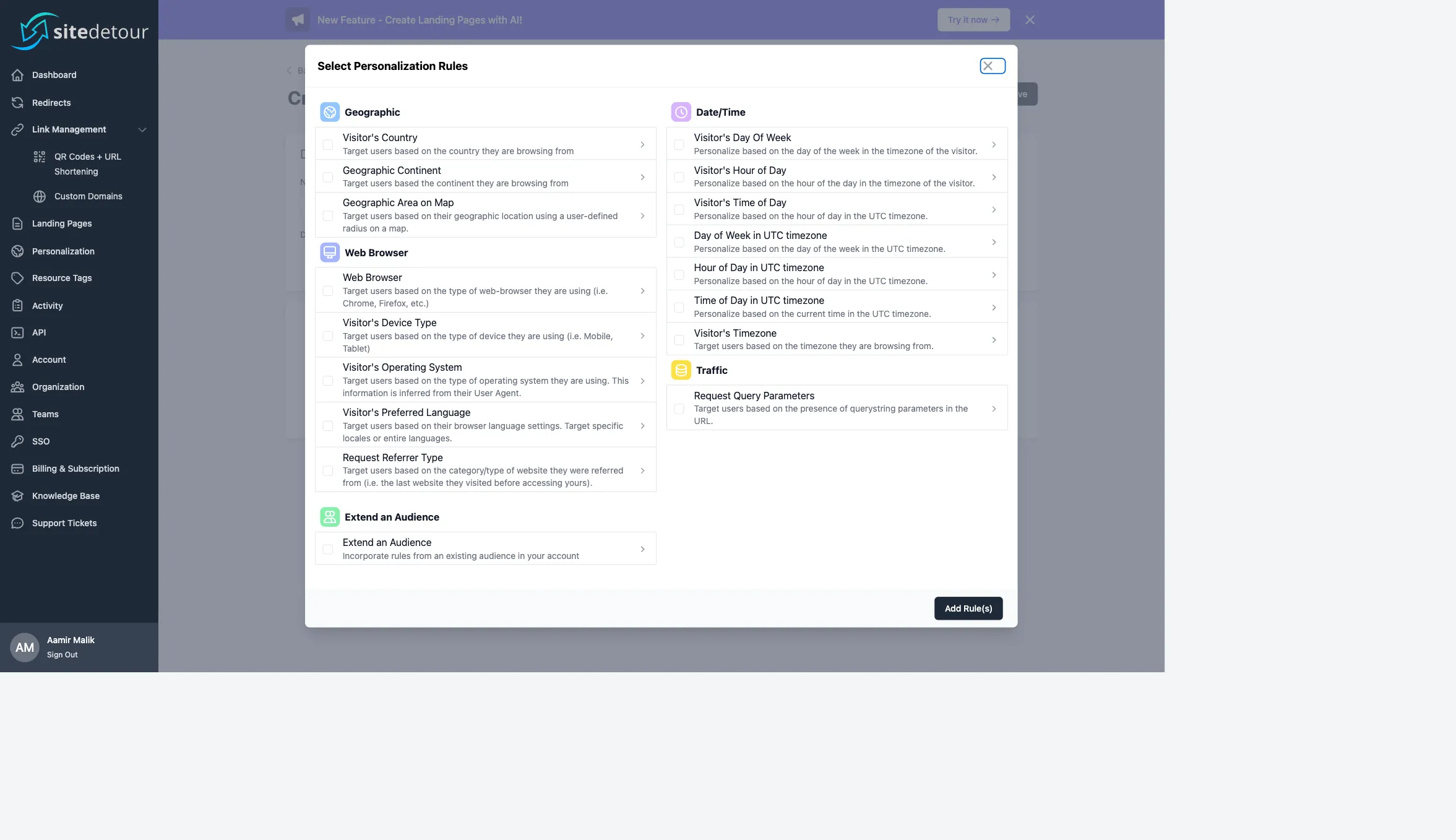
The targeting rule catalog
Audiences are built from one or more of these rules, grouped under five categories:
Geographic
- Visitor's Country — match against a list of ISO country codes.
- Geographic Continent — match continents (useful for rough region splits).
- Geographic Area on Map — a circular region defined by a latitude/longitude center and radius. Useful for store-locator and event-geofencing use cases.
Date / Time
- Visitor's Day of Week / Day of Week in UTC timezone — e.g. "weekends only".
- Visitor's Hour of Day / Hour of Day in UTC timezone — match specific hours. "Visitor's" version uses the visitor's local timezone.
- Visitor's Time of Day / Time of Day in UTC timezone — minute-precision time windows.
- Visitor's Timezone — match on the timezone itself (e.g.
America/New_York).
Web Browser
- Web Browser — Chrome, Firefox, Safari, Edge, etc.
- Visitor's Device Type — Desktop, Mobile, Tablet.
- Visitor's Operating System — iOS, Android, macOS, Windows, Linux, etc. Inferred from the User-Agent header.
- Visitor's Preferred Language — from the
Accept-Languageheader. Match on specific locales (en-US) or whole language families (es). - Request Referrer Type — classifies the HTTP
Refererinto Direct, Organic Search, Paid Search, Social, or Referral.
Traffic
- Request Query Parameters — presence (or value match) of a given query parameter. Great for UTM-driven campaign routing.
Extend an Audience
- Extend an Audience — include all rules from another existing audience. Lets you compose audiences without duplicating rule sets.
Match type: AND vs OR
Each audience has a top-level match type:
- AND — the visitor must satisfy every rule in the audience. Use for precise, intersectional segments (e.g. Spanish speakers in Barcelona on mobile).
- OR — the visitor must satisfy at least one rule. Use for broad, unioned segments (e.g. any Spanish speaker anywhere in the world).
AND and OR operate at the level of the audience as a whole. For multi-level boolean logic, compose multiple audiences and use Extend an Audience.
How audiences are evaluated
On every redirect, SiteDetour:
- Sanitizes the incoming request into a visitor profile: IP-to-location lookup (anonymized), User-Agent parse,
Accept-Languageparse, Referer classification, query-parameter extraction. - Walks the list of smart targets on the Smart Link (or the conditional rules on the redirect) in their configured order.
- For each target, evaluates the attached audience against the visitor profile using the audience's match type.
- On the first match, uses that target's URL. If no audience matches, falls back to the default target URL.
This evaluation happens at the redirect layer before the HTTP 302/301 is returned. There is no additional round-trip, and the visitor never sees the decision logic.
Creating an audience
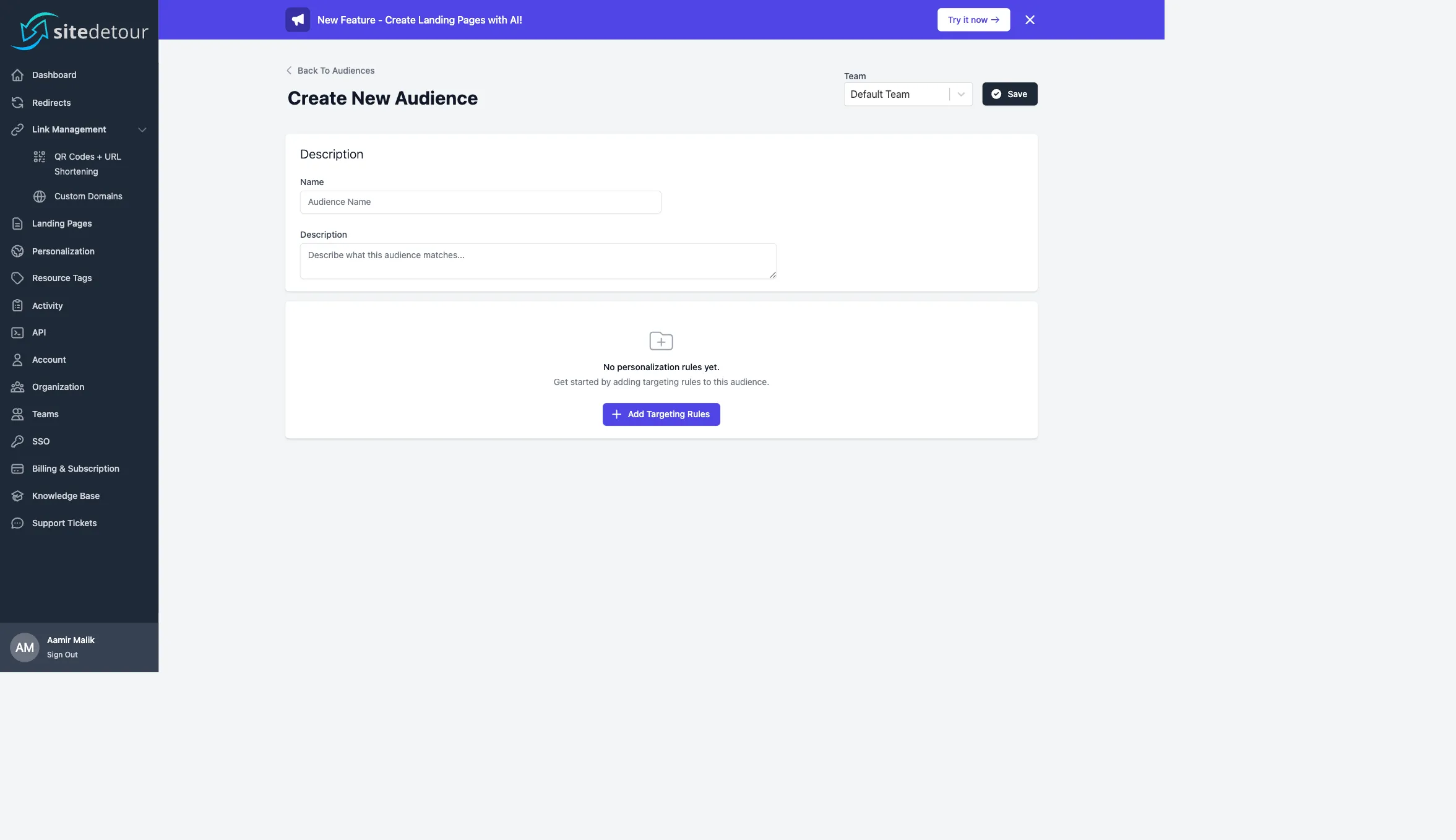
Go to Personalization and click Create New. Enter a name (internal label), an optional description, and choose a team if your plan has them. Then click + Add Targeting Rules to open the rule picker, select the categories you want, and configure each rule.
Save. The audience is now available in the smart target picker on any Smart Link or redirect.
Example: launch-day app routing
Goal: on launch day, route visitors to the right app store, but fall back to a marketing page on desktop and after the launch window ends.
- Create audience Launch window iOS:
Visitor's Operating System = iOSANDDay of Week in UTC = Tuesday. Match type: AND. - Create audience Launch window Android:
Visitor's Operating System = AndroidANDDay of Week in UTC = Tuesday. Match type: AND. - On the Smart Link:
- Smart target 1: Launch window iOS →
apps.apple.com/... - Smart target 2: Launch window Android →
play.google.com/... - Default target: marketing landing page.
- Smart target 1: Launch window iOS →
On the Wednesday after launch, no audience matches and all traffic falls through to the marketing page. No manual action required.
Privacy and IP handling
SiteDetour does not store visitor IP addresses in plaintext. IPs are anonymized before IP-to-location lookup, and only the derived country/continent/coordinates are persisted. No Personally Identifiable Information (PII) is stored from audience evaluations.
If you operate in a jurisdiction that requires further controls (e.g. GDPR, CCPA), you can disable analytics on a per-redirect basis. Audience evaluation itself does not persist any visitor-level record.
Plan availability
The number of personalization audiences available depends on your plan. Check the Billing page for your current cap. Audience add-ons are available for purchase without upgrading your whole plan.
Next steps
